

Google Analytics: Stop spam referrer (Semalt, Darodar, Free-Share-Buttons)
foregoing
For almost 6 months, a resurgence of visits from referent sites has appeared in the dashboards of audience statistics (acquisition then sources of traffic / behavior then events) from Google Universal Analytics.
These visits have the particularity of being concentrated on very short time slots and of generating very few or no page views. These visits all come from identified referent sites (Darodar, Semalt, Free-Share-Buttons, etc.).
Symptom analysis (traffic peaks in analytics data)
A first approach is to analyze the server logs to see the real existence of visible visits in Google Analytics. Indeed, each page call generates a trace in logs listing the accesses. In fact, by identifying the critical date and time slot in Google Analytics, we should get a match in this log file (user agent, accept language, etc.).
It is not!
From this observation, we can affirm that these are data directly injected into Google Universal Analytics, in fact, these visits are the work of spammer robots and not real visitors.
why? What are the goals, gains of spammers?
The principle is very well described by the site tythewebguy.com.
– Initially, the spammer subscribes to an affiliate program with Amazon whose goal is to receive a commission on Amazon sales that it will have generated as an affiliate.
– Secondly, this individual creates a site that redirects to the products on which he will receive a commission.
– Thirdly, it sets up an automaton which is in charge of injecting data into Google Analytics and in particular the address of the site it created in step 2.
– Finally, you notice a lot of visits all from the same site (referrer), you are tempted, either out of curiosity or exasperation to go to this site which gives you so many visits.
When you access the referring site, you will be redirected to a site, you will be rewarded with a cookie by Amazon in order to identify the partner who has sent a potential buyer to the site.
The lifespan of this cookie (tracer) is 24 hours. Thus, if you make a purchase on Amazon within 24 hours of this visit, the act of purchase will be assigned to your spammer and he will receive a commission.
Data injection into Google Universal Analytics
As explained, no visitor goes to your site in this spam context. In fact, you are entitled to ask yourself how we can inject data into Google Analytics
Analytics data spam, how does it work?
When you access a site that uses Google Universal Analytics, by displaying the requested page a request goes to the Google UA server to indicate that a person is visiting a page.
This request is intended for:https://www.google-analytics.com/collect?v=1t=pageview&_s=1&dl=HTTP://www.Url-du-site-.-com&tid=UA-I-Du-site
For event spam, we will use pixel tracking instead:

So, by doing a loop in script with a curl on this URL, you will cause as many events in Universal Analytics as your loop allows.
What to do?
Ineffective, unsuitable solutions
As seen previously, these visits are not real. In fact, blocking them using a server setting will be useless.
Blocking by htaccess / vhost directives (apache httpd.conf)
This setting tells the server to refuse the connection from the listed reference sites, however in the case of real hits (e.g. attack for denial of service), this mechanism would not make it possible to lighten the server load because the visit would be blocked after the latter is processed by the Server, here Apache.
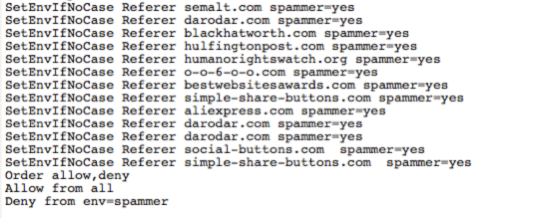
Your server would therefore receive a substantial load for unnecessary visits
The WordPress SpamReferrerBlock plugin
Based on a good idea, this plugin works on the basis ofA collaborative list regularly updated spammer sites. This plugin redirects visits from listed sites to a specific page/error page. However in this context, this plugin is useless because the information is sent directly to Google Analytics using your UA ID without going through your site.
On the other hand, the referrer spam generating hits on the server will be the subject of a specific article aimed at offering effective and lasting solutions.
Stop spam in Google Universal Analytics
Principle: The technical difference between a robot and a real visitor lies in the fact that the robot does not accept a cookie. In fact, we can consider that it is possible to test that the visitor is very real on the presence of a cookie with a known value.
I recommend that you implement this solution through Google Tags Manager.
Set up within Google Tags Manager & Google Analytics
1/ So we are going to create an HTML tag and inject the following script, it will allow you to place a cookie on the visitor’s computer.
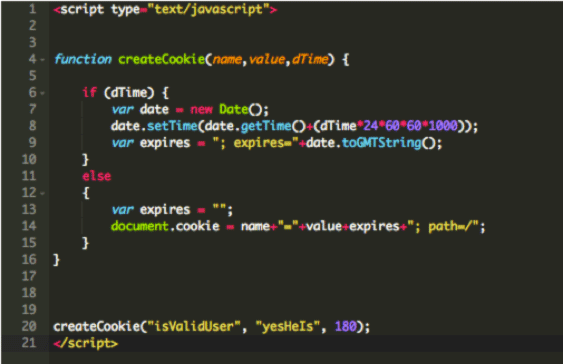
We will add a trigger rule on all pages to the tag
2/ We will then create a macro in order to transmit the value of the cookie previously placed to Tag Manager, so that then GTM can send this variable to Google Analytics.
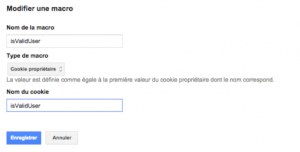
3/ We must now go to Universal Analytics where we will declare a custom dimension (Custom Dimension) with the name of the cookie (value transmitted by Tags Manager). This dimension will be assigned to the user.
Note the newly created dimension identifier carefully. In the example above, it is dimension 5. This reference ID will be reported in Tags Manager to tell the tool to which dimension to send the value of the cookie.
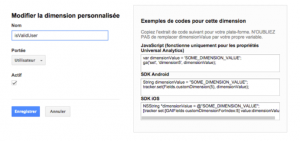
4/ Within Universal Analytics (always), we will create a new view in order to position a filter and thus obtain a view with the raw data (reference data) and a view with the filtered data.
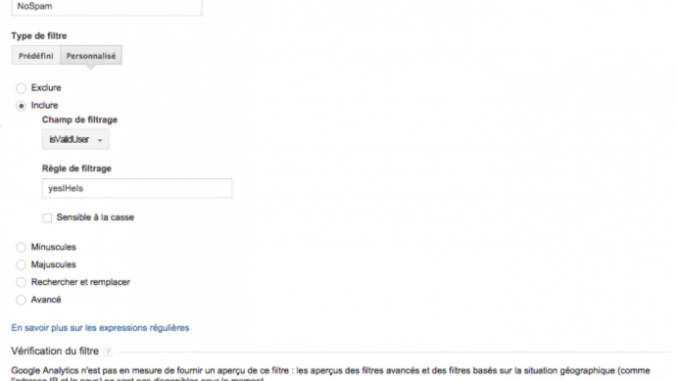
Here we create a view filter that will only include visitor traffic that dimensions the value of the cookie previously declared in Tags Manager (Step 1).
5/ To analyze the implementation, it is necessary to return to Tags Manager and edit the Universal Analytics (standard) tag
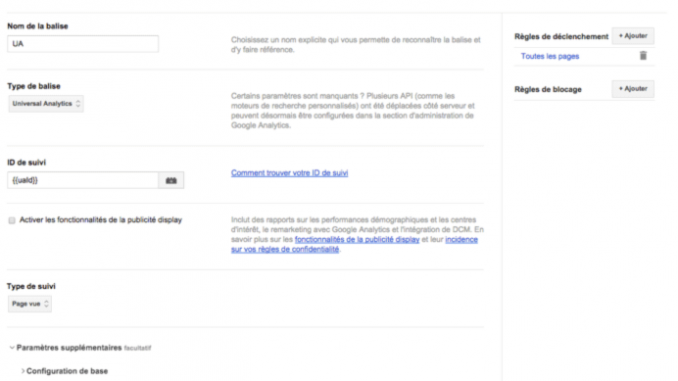
At the bottom of this screen, click on the item “Custom dimension” and add:
– In the “Index” field the identifier of the custom dimension (declared in step 3 in Google Universal Analytics).
– In the field “Variable”, the name of the macro, declared in step 2
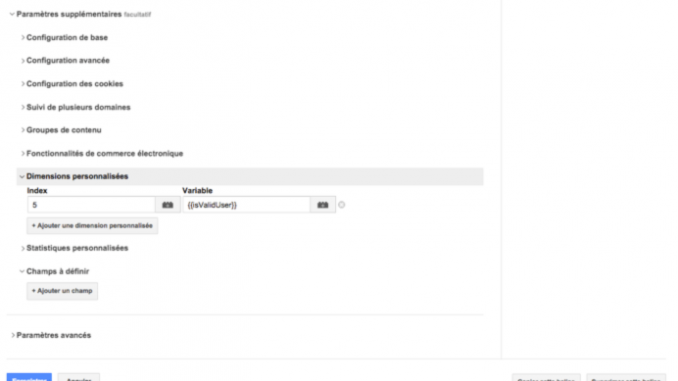
So in the reports of your new view, you will get the actual visits of your uncluttered visitors from all spammers.
Appendices & References
More about Darodar by TytheWebGuy >>>
Confirmation of Lunametrics
